Obsedo runs on a single DigitalOcean droplet that also serves
jvlyndark.com. Two hostnames, one machine, one nginx. These
diagrams show how a request finds its way to the right place, and why the
app and database cannot be reached from the internet directly.
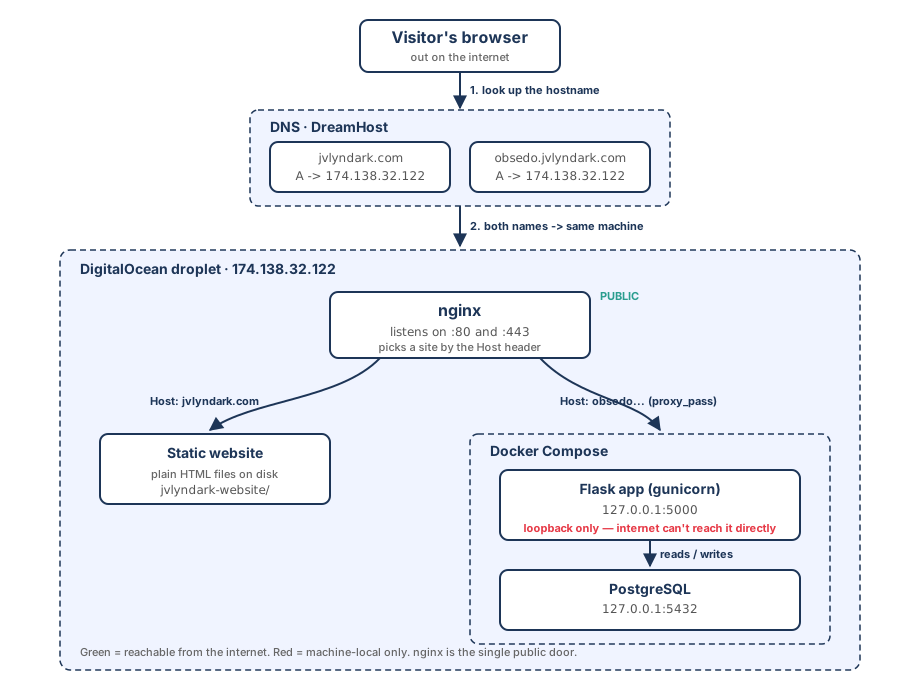
1. The request path
DNS answers the question which machine. Both hostnames resolve
to the same IP, so DNS alone cannot separate them. Once the request
arrives, nginx reads the Host header, which carries the
name the visitor actually typed, and uses it to pick a site: static
files for the apex, or a proxy to the Flask app for the subdomain.
Green is reachable from the internet. Red is machine-local only.
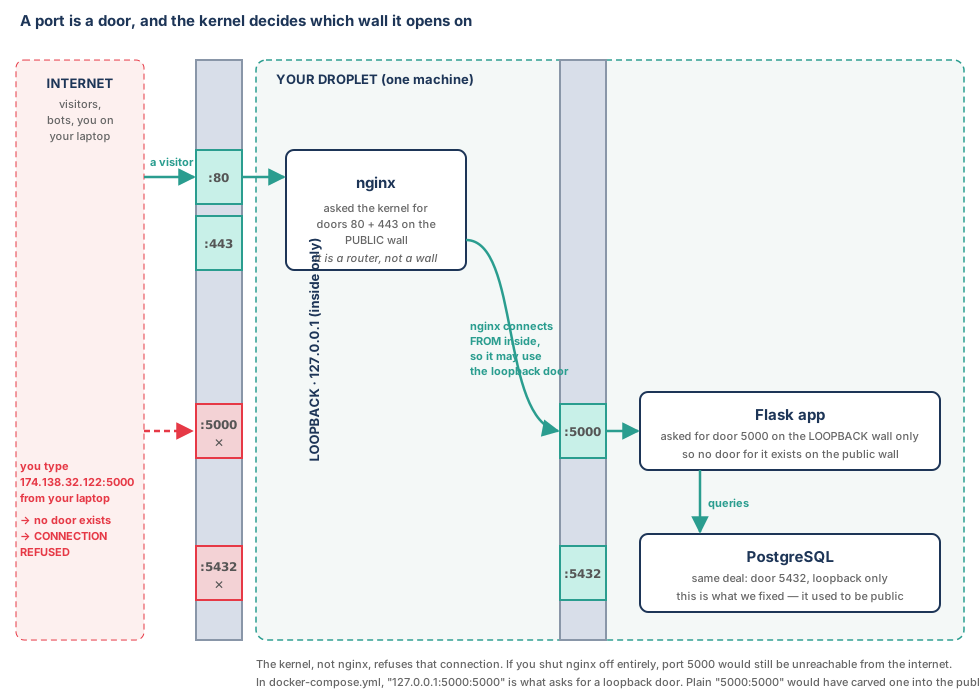
2. Ports, interfaces, and who is actually blocking what
A port is a numbered door, but the part that trips people up is that a
door is opened on a specific wall. A program asks the kernel
for a port on a particular network interface. nginx asked for 80 and 443
on the public interface. Flask asked for 5000 on loopback only, so no
door for it was ever carved into the public wall.
This means nginx is not the thing protecting the app.
nginx is a router, not a wall. The kernel refuses connections from the
internet to port 5000 because nothing is listening there. Shut nginx off
entirely and the app would be exactly as unreachable.
nginx can reach Flask for one unglamorous reason: it runs on the same
machine, so its connection originates from 127.0.0.1 and is
allowed through the loopback door.
In docker-compose.yml, 127.0.0.1:5000:5000
asks for a loopback door. A bare 5000:5000 would have cut
one into the public wall instead.
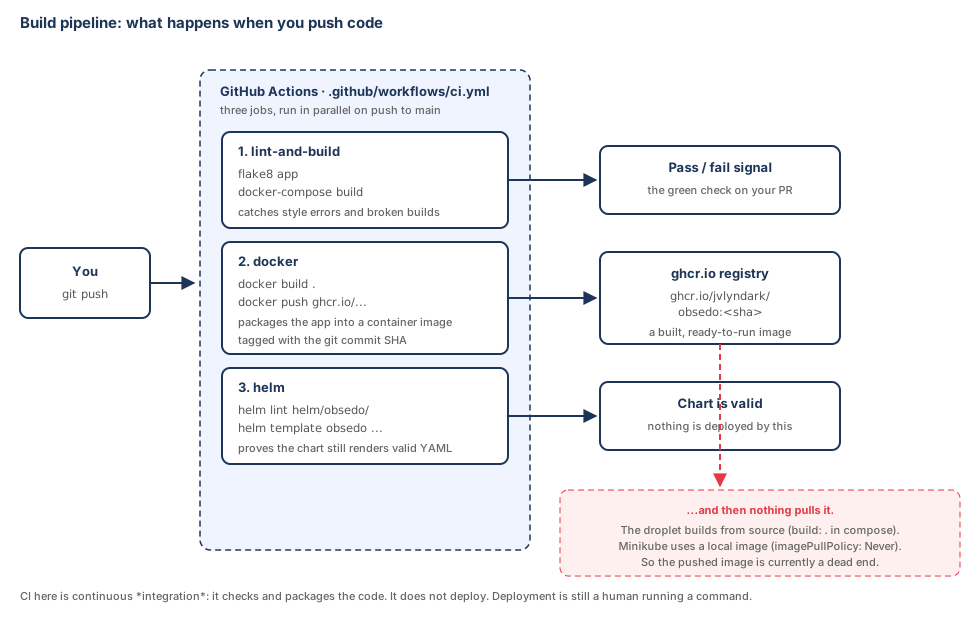
3. The build pipeline
Pushing to main triggers GitHub Actions, which runs three
jobs in parallel. One lints the code and proves it still builds. One
packages the app into a container image and pushes it to GitHub's
registry, tagged with the commit SHA. One checks that the Helm chart
still renders valid YAML.
Worth being precise about what this is: it is continuous
integration, not continuous deployment. It checks and packages
the code. It does not put anything live. Deploying is still a human
running a command on a server.
An honest gap: CI faithfully pushes an image to
ghcr.io on every commit, and then nothing pulls it. The
droplet builds from source (build: . in
docker-compose.yml) and the Kubernetes manifests use a
locally built image (imagePullPolicy: Never). So the
registry image is currently a dead end. Wiring a deployment to actually
consume it is the natural next step, and it is what would turn this from
CI into CD.
The red path is the dead end: an image is built and published on every
push, and no deployment target pulls it.
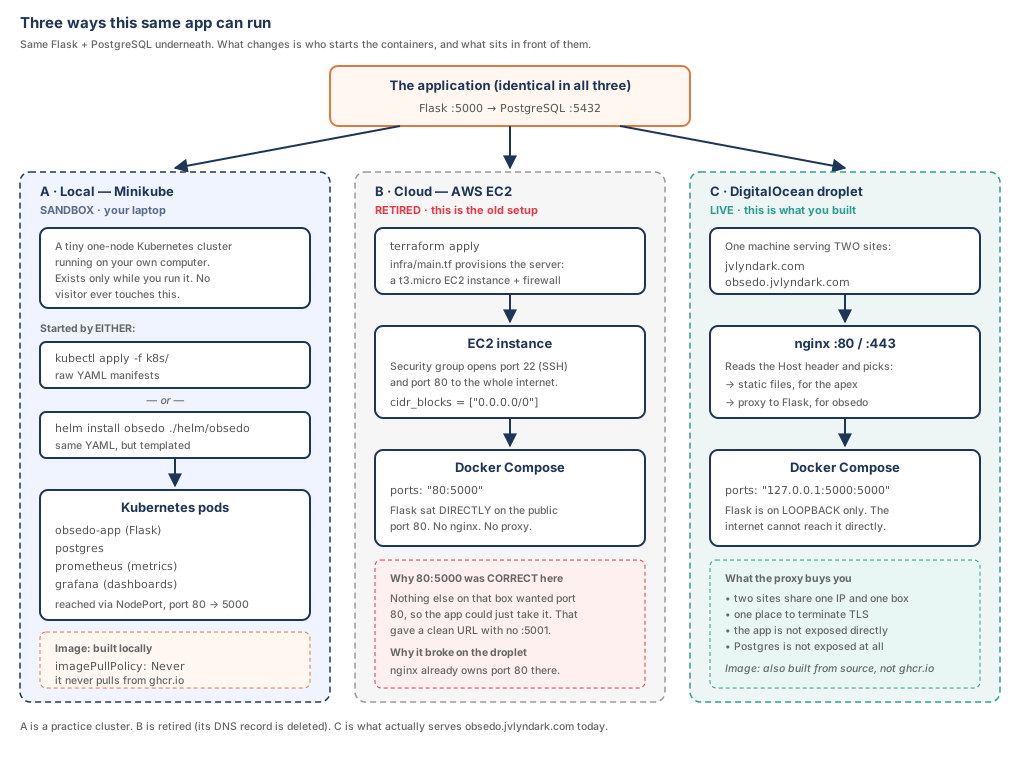
4. Three deployment targets
The same Flask and PostgreSQL pair can be run three different ways. What
changes between them is not the application, it is who starts the
containers and what sits in front of them.
A. Minikube is a single-node Kubernetes cluster that
runs on a laptop. It is a practice environment. No visitor ever reaches
it, and it vanishes when it is stopped. The raw manifests in
k8s/ and the Helm chart in helm/ are two routes
to the same result: Helm is the same YAML with the values pulled out into
a config file. You use one or the other, not both.
B. AWS EC2 is the retired setup, provisioned by
Terraform. Its security group opened port 80 to the entire internet and
there was no proxy, so Flask sat directly on the public port 80. That is
why docker-compose.yml once said 80:5000, and
it was the right call at the time. It only became wrong when the app
moved to a machine where nginx already owned port 80.
C. The DigitalOcean droplet is what actually serves this
page. One machine hosts two sites, nginx routes between them by hostname,
and the app and database are bound to loopback behind it.
The middle column is history, not architecture. Its DNS record has been
deleted. It is here because the contrast with the right-hand column is
the whole lesson.